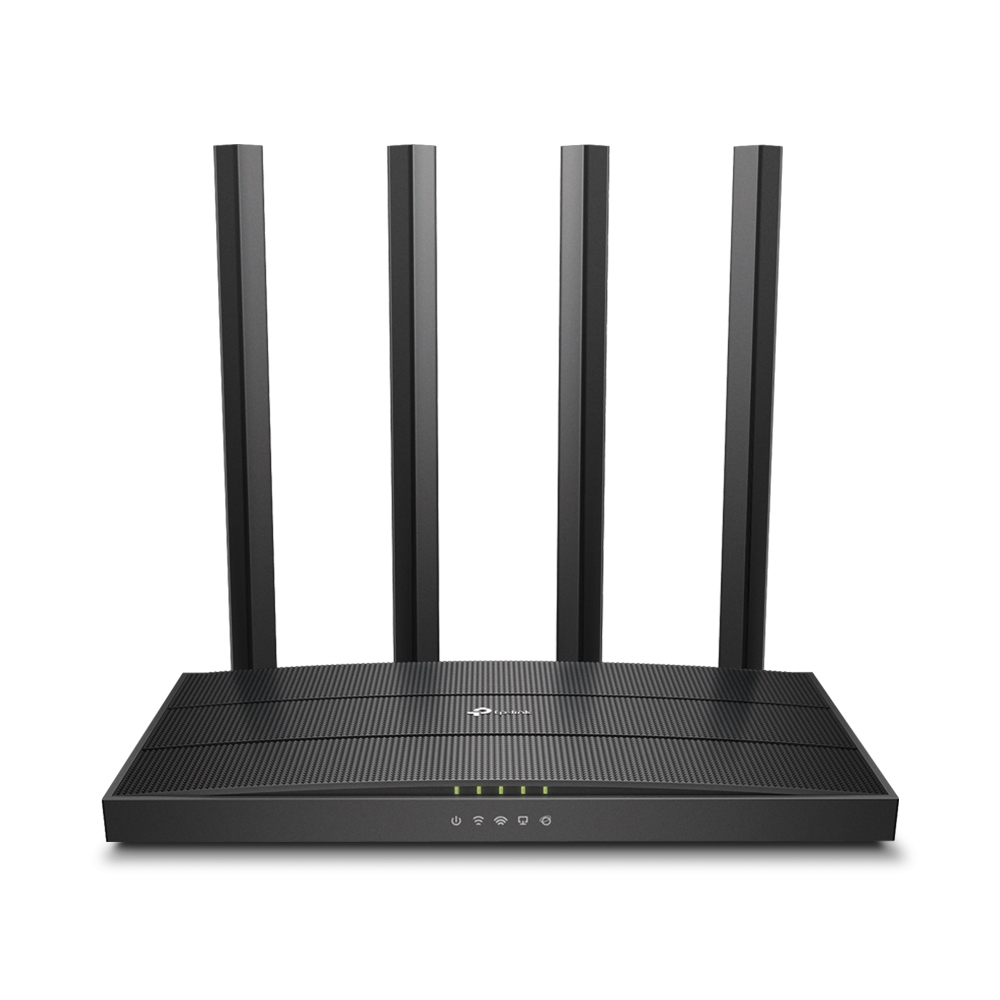
Buy TP-Link Archer C80 AC1900 Dual-Band Wi-Fi 5 Router
M-Pesa checkout · Delivery to all 47 counties · Pickup at Sarit Centre, Nairobi
In stock
Buy TP-Link Archer C80 AC1900 Dual-Band Wi-Fi 5 Router online in Kenya from Stermont Arcade. Pay by M-Pesa and get delivery to all 47 counties.
Order on WhatsAppAdd to Cart / Pay with M-PesaAbout TP-Link Archer C80 AC1900 Dual-Band Wi-Fi 5 Router
Product Overview & Key Benefits
The TP-Link Archer C80 AC1900 is a dual-band Wi-Fi 5 router for homes and small offices that connect phones, laptops, smart TVs, consoles and other network devices. TP-Link rates it for combined wireless link speeds of up to 1900 Mbps: up to 600 Mbps on 2.4 GHz and up to 1300 Mbps on 5 GHz. These are theoretical link rates, not a promise of internet speed. Actual performance depends on the broadband plan, connected devices, distance, walls, interference and router placement. The Archer C80 is intended for users who need dual-band Wi-Fi plus wired Ethernet connections for fixed equipment.
- AC1900 dual-band Wi-Fi 5, with up to 600 Mbps on 2.4 GHz and 1300 Mbps on 5 GHz.
- 3×3 MU-MIMO and beamforming to help compatible devices share wireless capacity.
- Four external high-performance antennas.
- One Gigabit WAN port and four Gigabit LAN ports for wired devices.
- Smart Connect, Airtime Fairness, parental controls and guest network features.
- TP-Link Tether app and web interface for setup and management.
Technical Specifications & Pack Details
Brand: TP-Link. Model: Archer C80. Wireless standard: Wi-Fi 5 / IEEE 802.11ac.
Wireless class: AC1900. Maximum link rates: 600 Mbps on 2.4 GHz and 1300 Mbps on 5 GHz. Antennas: Four fixed external antennas.
Ethernet: One Gigabit WAN port and four Gigabit LAN ports. Wireless technologies: 3×3 MIMO, MU-MIMO, beamforming, Smart Connect and Airtime Fairness. The product is one Archer C80 router.
TP-Link's setup documentation for the relevant hardware revision lists a router, power adapter, Ethernet cable and installation guides; confirm the included items and hardware version on the retail box.
Where & How to Use in Kenya
The Archer C80 can suit a household or small office with several phones, laptops, smart televisions and other Wi-Fi devices. A Gigabit wired connection can be useful for a desktop computer, television or console that stays in one place. The router is Wi-Fi 5, not Wi-Fi 6, and is not a cellular 4G SIM router.
Safety, Storage & Handling Guidelines
Use the supplied power adapter and place the router on a stable, ventilated surface. Do not cover ventilation openings, expose the unit to rain or moisture, or place liquids above it. Keep it away from excessive heat and direct sunlight.
Disconnect power before cleaning and use a dry, soft cloth. Do not open the casing or modify the antennas. Choose a strong Wi-Fi password and follow TP-Link's official instructions when updating firmware.
Buying & Pack-Size Guide
When comparing routers, check the Wi-Fi standard, dual-band speeds, Gigabit port count, MU-MIMO, antenna arrangement and management features. The Archer C80 is a Wi-Fi 5 model. Buyers who specifically need Wi-Fi 6 should compare a router labelled 802.11ax.
A mobile-data household that needs a SIM-based connection should choose a router explicitly designed for the required cellular network. Browse our routers and networking products for compatible networking accessories.
Delivery across Kenya & Nairobi Pickup
Order the TP-Link Archer C80 through Stermont Arcade and confirm the available delivery option at checkout.
Frequently Asked Questions
Is the Archer C80 a 4G SIM router?
A: No. It is a dual-band Wi-Fi router with Ethernet WAN and LAN ports. It does not use a SIM card as its internet source. Q: What wireless speeds does it advertise? A: TP-Link lists up to 600 Mbps on 2.4 GHz and up to 1300 Mbps on 5 GHz. These are theoretical link rates; actual throughput depends on the broadband plan, client device and environment. Q: How many wired devices can connect directly? A: It has one Gigabit WAN port and four Gigabit LAN ports. The WAN port connects to the modem or ONT, while the LAN ports connect wired client devices. Q: Can I manage it from a phone? A: TP-Link lists the Tether app for setup and network management. A web interface is also available.
How to use
For a fibre connection, connect the provider's ONT or modem Ethernet output to the router's WAN port. Connect the power adapter and follow the TP-Link Tether app or web interface to configure the internet connection, Wi-Fi name and password. If the internet provider requires special connection details or VLAN settings, obtain them from the provider rather than guessing.
Use 5 GHz for nearby devices that support it and need higher throughput. Use 2.4 GHz for compatible devices farther away where its longer reach may be useful. Actual speeds depend on the broadband plan and connected devices.
Before you start
Check that your internet service is delivered through an Ethernet modem or fibre ONT; this router does not take a SIM card. If your provider already supplied a router, confirm whether the Archer C80 will replace it or operate as an access point. Check the model and hardware revision printed on the device before downloading firmware or manuals.
The package contents can vary by regional hardware revision, so inspect the included power adapter and Ethernet cable when receiving the product.
Product Uses & Practical Buying Guide
Check the product details, exact model or size and the manufacturer's instructions before use. Confirm that it suits your intended setup and any accessories or compatibility requirements. Ask us on WhatsApp if you need help checking a detail.
Product Price, M-Pesa Checkout & Ordering in Kenya
TP-Link Archer C80 AC1900 Dual-Band Wi-Fi 5 Router costs KSh 5,500 / 1 router at Stermont Arcade and is in stock. Add it to your cart, pay by M-Pesa and enter the M-Pesa code from your SMS, or order on WhatsApp. Buying in bulk? Message us for a quote.
Delivery to Nairobi & All 47 Counties
Orders to Nairobi usually arrive the same day or the next day, and the other counties usually within 1 to 3 days. We confirm the delivery fee for your location before you pay. Prefer store pickup? Collect at The Sarit Centre, Karuna Road, Westlands, available for confirmed orders by appointment; contact us before visiting. See shipping and Nairobi delivery and pickup.
Buy TP-Link Archer C80 AC1900 Dual-Band Wi-Fi 5 Router in Nairobi, Kiambu, Nakuru, Kisumu, Eldoret & Mombasa
Stermont Arcade delivers to Nairobi, Kiambu, Nakuru, Kisumu, Eldoret, Mombasa and every other county in Kenya. Nairobi orders usually arrive the same day or the next day, and other counties usually within 1 to 3 days.
How to order
- Add the product to your cart, or message us on WhatsApp.
- Pay by M-Pesa and enter the M-Pesa code from your SMS.
- We confirm the delivery fee for your town before you pay, then dispatch your order.
Call +254 748 888 230 or order on WhatsApp.
Frequently asked questions
How can I buy TP-Link Archer C80 AC1900 Dual-Band Wi-Fi 5 Router in Kenya?
Order TP-Link Archer C80 AC1900 Dual-Band Wi-Fi 5 Router online at Stermont Arcade, pay by M-Pesa and get delivery to all 47 counties in Kenya. You can also order on WhatsApp.
Do you deliver TP-Link Archer C80 AC1900 Dual-Band Wi-Fi 5 Router outside Nairobi?
Yes. We deliver to Nairobi, Kiambu, Nakuru, Kisumu, Eldoret, Mombasa and all 47 counties, usually within 1 to 3 days. We confirm the delivery fee before you pay.
What is the price of TP-Link Archer C80 AC1900 Dual-Band Wi-Fi 5 Router?
TP-Link Archer C80 AC1900 Dual-Band Wi-Fi 5 Router costs KSh 5,500 at Stermont Arcade. Check the product price above for the size you want.
Can I pick up TP-Link Archer C80 AC1900 Dual-Band Wi-Fi 5 Router in Nairobi?
Yes. Collect at The Sarit Centre, Karuna Road, Westlands, open daily 8 AM to 8 PM. Confirm stock on WhatsApp first.
Check the exact item before ordering
This listing is for TP-Link Archer C80 AC1900 Dual-Band Wi-Fi 5 Router. Match the product name and any size, model or variant shown above to the item you need. If a specification is not listed, ask us to confirm it before payment.
- Compare the exact model or pack size shown on this page with the item you intend to buy.
- Read the product description and inspect the available photos; ask us about any detail that is not shown.
- Confirm current availability and the delivery fee for your location before dispatch.
If a specification is missing, ask Stermont Arcade on WhatsApp before placing your order.
Explore Networking & Smart Home and related buying guides
Browse the main category, compare related products and read practical guides before choosing.
 Buy TP-Link M7200 4G LTE Mobile Wi-Fi Router
 Buy Trevila Top 200SL Insecticide 100ml
 Buy Trevin Dudu Dust Insecticide 100g
 Buy Trevin Dudu Dust Insecticide 200g
 Buy Triger 5% EC Insecticide 50ml
 Buy Trinity Gold 452WP Fungicide 100g